Twin Range Filter Indicator MT5: Settings & Strategy Guide
Most trend indicators force you to choose between two bad options: a fast setting that flips on every bit of noise, or a slow setting that tells you about the trend after half of it is gone. The Twin Range Filter solves that by running a fast and a slow range filter together and only changing its mind when price makes a real directional shift. This guide explains how the Twin Range Filter indicator for MT5 works, how to read its buy and sell signals, which fast and slow settings to test, and how to apply it to a live example: gold’s sharp drop below $3,900 this week.
01What the Twin Range Filter is
A range filter is a simple idea. Instead of following every tick, it draws a line that only moves when price travels further than a set range. Small wiggles inside that range are ignored, so the line stays flat in quiet markets and steps up or down when price actually breaks out.
The problem with a single range filter is the one every trader knows: make it tight and it whipsaws, make it wide and it is late. The Twin Range Filter Indicator for MT5 combines a fast and a slow adaptive range filter so it can react to genuine moves while ignoring short-term volatility. It then plots green and red arrows on the chart to mark potential buy and sell zones when the two filters line up.
Fast filter
Set by Fast Period and Fast Range. It controls how quickly the indicator reacts and how much short-term volatility is smoothed out.
Slow filter
Set by Slow Period and Slow Range. It reacts more slowly and gives the stronger trend confirmation.
Signal arrows
Green and red arrows appear when dual filter alignment points to a real directional shift, not a one-candle spike.
02Why two filters beat one
Think of the fast filter as a scout and the slow filter as the main army. The scout notices a change early but is easily fooled. The army is slow but rarely wrong about direction. By combining both, the Twin Range Filter gives you a single line and a single set of signals that sit between the two extremes.
In practice this matters most in three situations:
- Noisy, choppy sessions: small moves that would trigger a fast moving average crossover are filtered out, so you see fewer false flips.
- News-driven breakouts: when a big candle clears the range, the filter steps quickly in the new direction instead of waiting many bars like a long moving average.
- Trend bias: even without arrows, the filter line itself works as a simple trend guide. Price above a rising line favours longs; price below a falling line favours shorts.
Because the filter is built on price ranges rather than fixed percentages, it adapts to the instrument. The same logic works on a slow-moving forex pair and on a fast market like gold, as long as you tune the range values to suit it.
03Reading Twin Range Filter buy and sell signals
The signals are designed to be read at a glance. The indicator plots green arrows for potential buys and red arrows for potential sells, based on its two filters agreeing on direction. The real skill is deciding which arrows to act on.
📈 Bullish signal
- A green arrow prints after the filter line turns up.
- Price closes above the filter line, not just wicks through it.
- Best taken in the direction of the higher-timeframe trend.
- Stop goes below the recent swing low or below the filter line.
📉 Bearish signal
- A red arrow prints after the filter line turns down.
- Price closes below the filter line on the signal candle.
- Stronger when a key support level has just broken.
- Stop goes above the recent swing high or above the filter line.
A good habit is to wait for the candle that prints the arrow to close. An arrow that appears mid-candle on a live bar is a work in progress until that bar is finished.
04Twin Range Filter settings to test
The indicator gives you full control over both filters. According to the product description, the inputs are: Source (close, open, high, low or average price types), Fast Period, Fast Range, Slow Period, Slow Range, plus a built-in back-test option with start time, TP and SL in points, on-screen alerts and push notifications.
There is no single best setting. The table below gives starting points to test in the MT5 Strategy Tester, not recommended or proven values. Always compare them on your own symbol and timeframe.
| Trading style | Timeframe | Fast Period / Range | Slow Period / Range | What to expect |
|---|---|---|---|---|
| Scalping | M5 to M15 | 14 / 1.2 | 40 / 1.8 | More signals, more noise; needs a strict trend filter |
| Intraday | M30 to H1 | 27 / 1.6 | 55 / 2.0 | A balanced starting point for most pairs and gold |
| Swing | H4 | 27 / 2.0 | 70 / 2.5 | Fewer, slower signals that hold longer trends |
| Position | D1 | 35 / 2.0 | 90 / 3.0 | Very few flips; good as a trend bias only |
Two simple rules help when tuning. Raising the Period values makes the filters slower to react. Raising the Range values widens the band price must clear, so fewer moves count as a real shift. If you are getting whipsawed, widen the ranges first before touching the periods.
05Step by step: setting up the Twin Range Filter in MT5
Install and attach
Download the indicator (or the free demo) from the MQL5 Market, then drag it onto your chart from the Navigator window in MetaTrader 5.
Choose the source price
Close is the usual choice. Average price types can smooth the line further on very noisy symbols.
Tune fast, then slow
Set the fast filter for short-term sensitivity first, then set the slow filter for trend confirmation. Use the table above as a starting point.
Run the built-in back-test
Enable Back Test Indicator, set a test start time and your TP and SL in points, and compare several setting combinations on the same chart before trading any of them.
Turn on alerts
Enable on-screen alerts or push notifications so new signals reach you on your phone, then review each one against your trading plan before acting.
06A current example: gold breaks below $3,900
Gold gives a clear lesson in why a filter that waits for a real shift is useful. On Friday, 30 October, spot gold fell below $4,000 and traded around $3,880, down about 3.5% on the day and close to 3% on the week, its lowest level since early October 2025, according to Kitco. Fortune’s daily price tracker put gold at $3,907 mid-morning, about 7% lower than a month earlier.
The backdrop was a mix of high oil prices feeding inflation worries and a Federal Reserve that held rates unchanged on 28 October while markets priced in the chance of a hike in December. Analysts quoted by Kitco also pointed to investors selling gold to raise cash after a tech sell-off.
How would a Twin Range Filter trader approach a move like this? On an H1 or H4 chart, the days of choppy trade around $4,000 are exactly where a single fast filter keeps flipping. The twin design is meant to stay quiet through that kind of noise and only commit once price breaks decisively through the range. After a break of that size, the filter line itself becomes a useful trailing reference: as long as price stays below a falling line, the short-term bias remains bearish. With US elections on Tuesday and the jobs report due next Friday, volatility may stay high, which is when wider range settings and confirmed candle closes matter most.
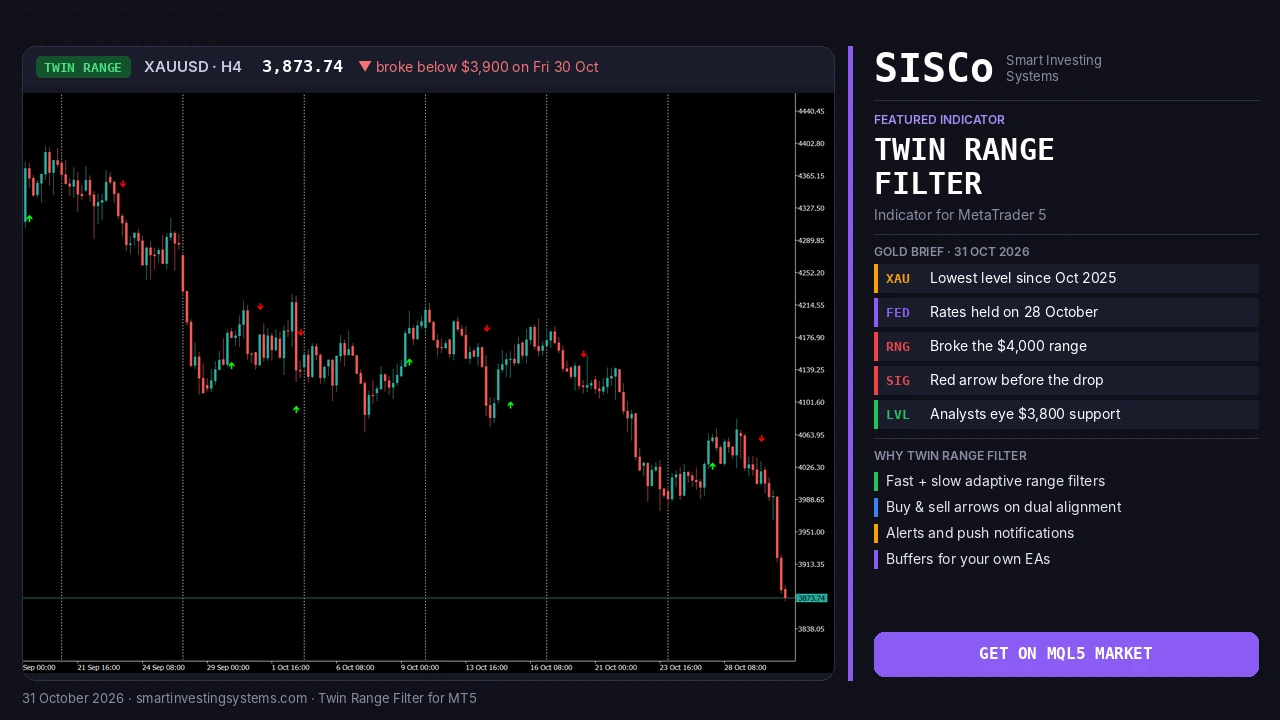
The XAUUSD H4 chart in the banner above shows this in practice. Gold peaked near $4,400 in mid-September, then spent most of October chopping between roughly $4,000 and $4,200 while the Twin Range Filter printed alternating green and red arrows. A short bounce to around $4,060 earlier this week was followed by a red sell arrow, and price then slid through $4,000 and kept falling to about $3,874 on Friday, with no new green arrow since.
After a fast drop, the next signal is often a counter-trend green arrow. Treat it with care until price also clears a nearby resistance level.
Pair the filter with the Support and Resistance Levels Indicator for MT5 so signals near major levels like $3,800 or $4,000 get extra attention.
07Common mistakes and how to avoid them
- Using scalping settings on H4: fast, tight settings on a slow chart give too few bars of context and too many flips. Match settings to the timeframe.
- Trading every arrow: the filter reduces noise, it does not remove it. Use a higher-timeframe trend or a key level as a second condition.
- Ignoring the stop: place the stop beyond the filter line or the last swing, and size the trade so a loss is affordable.
- Skipping the back-test: the built-in tester exists so you can compare settings first. Use it on each symbol you trade.
- No exit plan: combine the filter with a trailing tool such as the Chandelier Exit Indicator for MT5 to manage open trades.
08Automating Twin Range Filter signals in an EA
The indicator exposes buffers you can read from your own Expert Advisors, which makes it a good building block for automation. A custom EA can wait for a confirmed arrow, check a higher-timeframe filter, place the order with a fixed risk per trade and trail the stop along the filter line, the same way every time.
SISCo has built more than 1,549 trading systems since 2017. If you want the Twin Range Filter inside your own EA with your rules and money management, see how we build custom Expert Advisors or explore our algorithmic trading development service.
09Twin Range Filter FAQ
What do Fast Range and Slow Range control?
They set how wide each filter is, and so how much short-term or longer-term volatility is smoothed out before the line moves.
Does the Twin Range Filter have alerts?
Yes. It can show on-screen alerts and send push notifications to your phone when a new buy or sell signal appears.
Which timeframe works best?
It can be used from scalping to swing trading. Lower timeframes give more signals and more noise; H1 and H4 are a sensible place to start testing on gold and major pairs.
Is there a free demo?
Yes. You can download a free demo from the MQL5 Market and run it in the MetaTrader 5 Strategy Tester before buying.
Try the Twin Range Filter on your own charts
Test fast and slow settings on gold, forex pairs or indices with the free demo and the built-in back-test, then let alerts and push notifications bring new signals to you. Want it inside an EA? Our team can build it for you.
Trading involves risk and you can lose money. This article is for education only and is not financial advice.
Gold · indicators · mt5 · Trend · Twin Range Filter
Related articles
Heikin Ashi RSI MT5: How to Read HARSI Candles (Gold Guide)
Learn how the Heikin Ashi RSI (HARSI) indicator for MT5 turns RSI into smooth candles, which settings to test, and how to read it…
Read more →
Trend Strength Index MT5: Is Gold’s Rebound Steady Before CPI?
Learn how the Trend Strength Index for MT5 shows how steady gold's rebound is before US CPI, with settings, signals and a step-by-step plan.…
Read more →
Convert MT4 EA to MT5: What OANDA’s MT4 Shutdown Means
Convert MT4 EA to MT5 before brokers like OANDA Japan switch off MT4. Learn what changes in MQL5, how to test it, and get…
Read more →Need a team that can design, build and maintain it all?
Let's talk. Tell us about your project and we'll reply with honest timelines.